> For the complete documentation index, see [llms.txt](https://help.onform.com/llms.txt). Markdown versions of documentation pages are available by appending `.md` to page URLs; this page is available as [Markdown](https://help.onform.com/start-here/onform-in-5-minutes.md).
# Onform in 5 minutes
Record, analyze, teach and organize: the five things you'll do most in Onform, and which quick start fits you.
Works on: iPhone, iPad, Android and web. Recording, Compare and recording a Voice-over need the iPhone, iPad or Android app.
Onform is a video coaching app. Coaches and athletes film reps, break them down, talk them through and keep every video in one place, so feedback doesn't get lost in a camera roll or a group chat. Here's the whole idea in four steps, then the quick start that fits you.
## 1. Record or import
Film a rep with the Onform camera on your iPhone, iPad or Android phone, or import a video you already have from your photos, your files or another camera. In the web app you upload videos instead of recording.
Record inside an athlete's workspace and the video goes straight into their Library, so there's nothing to sort later. Everything you record or import also shows up in **Library - All Files**, your own private list of every video.
## 2. Analyze
Open any video to break it down:
* **Slow motion and frame by frame:** slow the video right down or step through it one frame at a time to find the moment that matters, like impact, foot strike or release.
* **Drawing tools:** draw lines, arrows, circles and angles on the video to show what you see.
* **Compare:** play two videos side by side, such as today's serve and last month's, or an athlete's rep and a demo. Link them so they play and step together.
* **Voice-over:** talk through a video while you play, pause and draw on it. Onform saves it as a new video your athlete can watch as often as they like.
The iPhone and iPad app has more, such as a 2D skeleton and, for golf, 3D swing analysis. See [Analysis tools at a glance](/how-onform-works/analysis-tools.md).
## 3. Teach and share
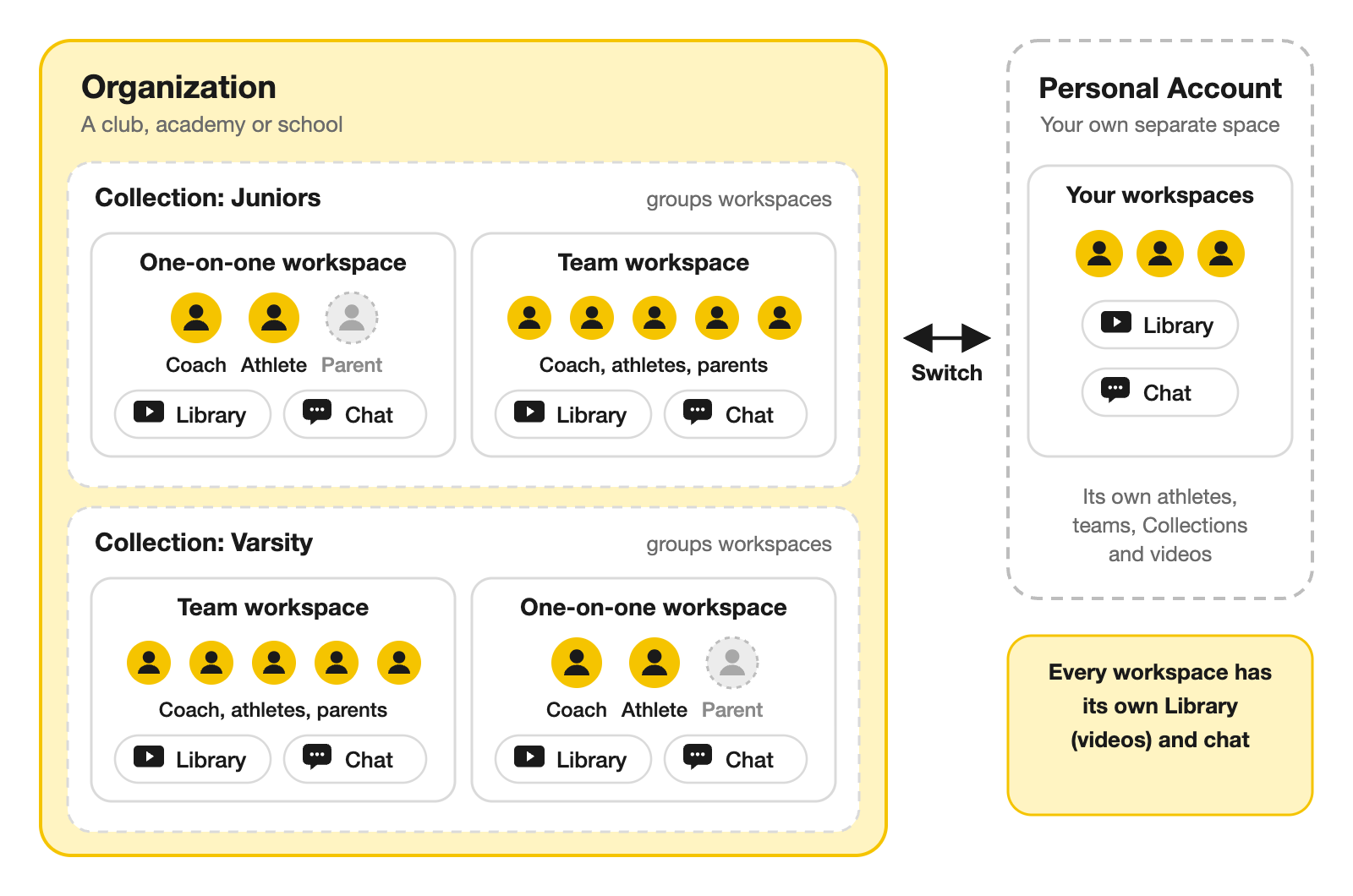
Every athlete you coach has a workspace with you, and each workspace has its own chat.
* **Send lessons and clips** in the chat, or share a video with one person or a group, like your pitchers or your sprint group.
* **Hear back from your athletes:** they send practice clips and questions in the same chat, so you can reply with a Voice-over.
* **Share outside Onform:** send a link to someone who doesn't use the app, such as a college coach or a physio.
Athletes and parents invited by a coach use Onform free. Coaches need a coach plan, or a coaching seat from their club or school. See [Who pays for Onform?](https://github.com/Onform-Inc/onform-docs/tree/main/account/plans-and-payments/who-pays-for-onform.md)
## 4. Organize
* **Library:** your videos. Each workspace has its own Library, and **Library - All Files** holds everything.
* **Workspaces:** a private space for one athlete, or for a whole team, with its own chat and Library. You can add parents and other coaches.
* **Collections:** groups of workspaces on your Home screen, like "Juniors", "Varsity" or "Tuesday clinic", so the right athletes are one tap away. You can message a whole Collection at once.
* **Organizations:** the shared home for a club, academy, school or team, where several coaches work with the same athletes. Use the account switcher on the Home screen to move between your organization and your **Personal Account**.
## Which quick start is for me?
| You are | Start here |
| ------------------------------------------------------- | ---------------------------------------------------------------------------- |
| A director or facility owner who pays for your coaches | [Run a program](/start-here/program-director.md) |
| A coach whose academy, club or school pays for Onform | [Coach in your program](/start-here/staff-coach.md) |
| A private coach or instructor running your own business | [Run your own coaching business](/start-here/solo-coach.md) |
| A college or pro coach, or a performance analyst | [Coach a college or pro team](/start-here/team-coach.md) |
| A high school, club or travel team coach | [Coach a high school, club or travel team](/start-here/school-club-coach.md) |
| An athlete whose coach invited you | [You were invited by a coach](/start-here/athlete.md) |
| An athlete training without a coach | [Train on your own](/start-here/diy-athlete.md) |
| A parent following your child's progress | [Follow your child's progress](/start-here/parent.md) |
## Related
* [What is Onform?](/how-onform-works/what-is-onform.md)
* [What works on which app](/how-onform-works/what-works-on-which-app.md)
* [Analysis tools at a glance](/how-onform-works/analysis-tools.md)
* [What sports can I use Onform for?](/how-onform-works/what-sports-can-use-the-onform-app.md)
---
# Agent Instructions
This documentation is published with GitBook. GitBook is the documentation platform designed so that both humans and AI agents can read, navigate, and reason over technical content effectively. Learn more at gitbook.com.
## Querying This Documentation
If you need additional information that is not directly available in this page, you can query the documentation by asking a question.
Perform an HTTP GET request on the following URL with the `ask` and `goal` query parameters:
```
GET https://help.onform.com/start-here/onform-in-5-minutes.md?ask=&goal=
```
`ask` is the immediate question: it should be specific, self-contained, and written in natural language.
`goal` is what the user is ultimately trying to achieve, the reason they need the answer. Sharing it helps GitBook give you a better, more relevant answer. A goal is most helpful when it describes the outcome the user wants rather than restating the question. For example, with `ask=how do I create an API token`, a goal like `automate deployments from our CI pipeline` lets GitBook tailor the answer to that use case.
The response will contain a direct answer to the question and relevant excerpts and sources from the documentation.
Use this mechanism when the answer is not explicitly present in the current page, you need clarification or additional context, or you want to retrieve related documentation sections.